cloud security
65 Topics
Microsoft Sentinel Deployment & Log Ingestion: Ingesting Platform Logs via Diagnostic Settings
Hello Immersive Labs community, I’ve been working through the lab tasks and successfully completed tasks 1 through 6. However, I’m stuck on task 7, which asks: "A storage account has been deleted. What would be the data type of the generated log?" The task seems oddly described, and I can’t find any clear hints in the lab briefing or online resources. I’ve tried querying various data types like AzureActivity, AuditLogs, StorageBlobLogs, StorageFileLogs, and others, but none seem to fit correctly. Could anyone provide guidance or confirm which data type is actually relevant for this scenario? Are there any specific tips or resources I might be missing? Thanks in advance for your help!2.1KViews0likes1Comment
I want to start again with the lab. Can you reset the lab for me?
I want to complete the lab for a second time.Solved901Views0likes1Comment
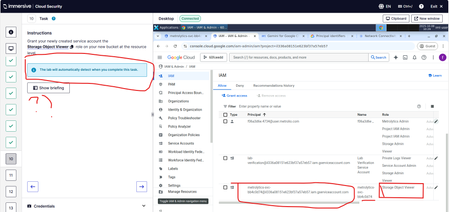
Google Cloud Basics: Ep.7 – Demonstrate Your Skills - Task 10
Hi Team, I have been stuck on this lab for like 24hrs and I am pretty sure I am doing the right thing as per knowledge. Is there a chance this lab is broken as the lab doesn't auto-complete at all ? I assign and grant the storage object viewer permissions on IAM for the new Service Account but it doesn't apply at all .899Views0likes3CommentsAWS Security Hub: Integrations and Custom Actions
Hi everyone! Q10 (create a rule called SecHub-tickets) on this lab is not completing. After I click create rule (Step 5) on the EventBridge, I got an error: Access denied to iam:CreateRole You don't have permission to iam:CreateRole. To request access, copy the following text and send it to your AWS administrator. Anybody had the same error here or working as expected there? Thanks in advance!Solved800Views1like6CommentsMicrosoft Sentinel: Threat Hunting Tools You Could Be Missing Out On
As a SOC analyst, incident responder, or cloud security engineer using Microsoft Sentinel as your SIEM, you’ll be familiar with its standard features, such as incidents, analytics rules, and threat intelligence. However, you might not be so familiar with workbooks, which enable data visualisation and dynamic reporting, or notebooks, which empower you to document threat hunts and build replayable incident response playbooks. Let’s look at how these Microsoft Sentinel features can improve your incident response and threat hunting. Eyes on: monitoring metrics with workbooks One key advantage of workbooks is their ability to dynamically visualise data from a range of sources across your Microsoft environment and beyond. This provides obvious security advantages via monitoring of metrics such as request rates, egress traffic, CPU utilisation, and management plane actions. If your workbook dashboard shows an unexpected spike in requests to a sensitive resource, it could be a sign that something isn’t quite right. Visualising these metrics in near-real-time graphs helps spot early signs of compromise and speeds up detection. The other, often overlooked advantage of metrics in workbooks comes from a management perspective. Microsoft Azure offers many template workbooks for common data reporting needs, including the Cybersecurity Maturity Model Certification and Azure Security Benchmark workbooks. Up-to-date reporting on performance against these core security benchmarks is critical for security engineers to identify insecure points in your Microsoft estate. For CISOs and SOC managers, the capability to track improvements in KPI metrics like Mean Time to Triage or Mean Time to Repair can prove invaluable in monitoring SOC performance and evidencing the positive effects of realistic training. This can be achieved using the Security Operations Efficiency Workbook offered as a template workbook. To learn more about monitoring metrics with workbooks, check out the newly released Azure Workbooks: Monitoring Metrics lab. Diving deep: security analysis with workbooks From a security perspective, workbooks can be a powerful tool if you get creative. The ability to query logs and metric data across a wide range of sources means you can combine information to enhance threat intelligence and identify unusual behavior in investigations through visual comparison of standard baseline activities. Workbooks can build complex queries into logs from a range of sources, including sign-in logs, Windows Event logs, networking logs, and resource activity logs. By cleverly designing log queries within your workbooks, you can visually detect anomalous activity and chart this in workbook reports that can be shared across a SOC team. Graphically representing data in workbooks can have numerous advantages. By visualising resource relationships, you can easily identify shadow IT or resources deployed by threat actors for persistence, such as a lone resource in a location your business doesn’t use. For another example, you can diagram external collaborations in Microsoft Teams or email connections in Microsoft Outlook to identify anomalous behaviour and hunt for potential risks. By visualising data dynamically in workbooks, you can boost security analysis and threat hunting across every stage of the Cyber Kill Chain. Our Microsoft Sentinel: Security Analysis with Workbooks lab covers this further. Improved response: incident investigations with notebooks Microsoft Sentinel integrates Jupyter notebooks into the Microsoft Azure portal, enabling you to run and document code during SIEM investigations in Microsoft Sentinel. If you’re in a SOC team, notebooks provide some seriously useful advantages: Readable code for other analysts: By tracking your steps in a notebook using markdown, you can explain your queries, capture outputs, and make your work easy for another analyst to understand. Standardise your analysis and response: Once you've made a notebook for a specific security event, you can reuse it whenever a similar incident occurs. This gives you a step-by-step guide to analyse and respond to the new incident. Share incident response knowledge: Notebooks are also very easy to share with other people. If you want to train a more junior team member in how to analyse and respond to that specific security event, you can share the notebook with them. This reduces reliance on individuals, helps to prevent silos, and teaches other members of your team. Improve your response: The next time a specific security event occurs, you may realise that other data sources or queries can be helpful to investigate. It's very easy to add to and develop your notebook. This means you can improve your response over time as you iterate on the work you've already done. For hands-on experience getting to grips with notebooks, check out the Microsoft Sentinel: Introduction to Notebooks lab. Tracking threat actors: hunting with notebooks It’s not just the inherent advantages of Jupyter notebooks that this feature brings to the table. By enabling sophisticated automation and log querying, notebooks in Microsoft Sentinel can offer detailed investigation guides, empowering your threat hunting and incident response teams. By connecting natively to Microsoft Sentinel workspaces, notebooks can query Log Analytics log tables to investigate recent activity, sign-in logs, requests, and more. By collating this information into a centralised location, your investigation can seamlessly track a threat actor’s movements through your estate. Then, by storing these queries in a notebook, you can reuse them repeatedly, which can rapidly reduce investigation times for commonly occurring incidents. The example below shows a saved query that displays any write operations against a virtual machine with a provided name. It’s reusable, repeatable, and reliable. By standardising incident investigations and creating reusable, documented queries for threat hunting, you can reduce time wasted by rewriting the same playbooks repeatedly, greatly improving your SOC team's efficiency. The new Microsoft Sentinel: Threat Hunting with Notebooks lab gives hands-on experience tracking a realistic threat actor who has compromised a Microsoft Azure account. Beyond workbooks and notebooks: Empowering your SOC team Workbooks and notebooks are handy tools in Microsoft Sentinel, but they form only a small part of the arsenal. The newly released Microsoft Sentinel: Threat Hunting with Notebooks and Workbooks collection is ideal for SOC analysts, incident responders, forensics specialists, and cloud/security engineers who use Microsoft Sentinel as their SIEM and want to expand their knowledge. By adding this collection to our existing Microsoft Sentinel content, we cover the core areas of the Microsoft Sentinel (SC-200) certification while offering more advanced content for experienced SIEM users. Gain a competitive edge by building hands-on experience in realistic scenarios so you can use Microsoft Sentinel to its fullest potential. Share your thoughts Why not give this content a try and let me know how you got on? Remember, if you need help with a lab or want to collaborate with other community members, share your question on the Help forum!600Views1like0CommentsHow do you use the clipboard feature within labs?
Can anyone tell me how I can use the clipboard feature within labs?Solved599Views0likes2CommentsDecoding Coding: Picking a Language
These days, more and more jobs can benefit from being able to write simple scripts and programs, especially in cybersecurity. For example, pulling data from an API, scraping web pages, or processing large data files to extract information – the list of uses is virtually endless! Tempting as it is to dive right in, there are several things worth thinking about before you begin. This article will discuss one of the most important choices – selecting a language. What to consider when choosing a language A basic understanding of programming languages can make your life easier, increasing your adaptability and finesse in different environments. But with tons of languages like Python, Java, JavaScript, Go, Rust, and more, which one should you choose? Here are the crucial factors to consider: What's available Can you install whatever language you like to run your code, or are there limitations? If you have an enterprise-managed computer, you might not be able to install new software or languages, and you may need to use the default options. For Windows, this is PowerShell. Bash Script is the equivalent for Mac and Linux devices, and Python is often available too. Your personal experience and interest This one might sound obvious, but it does matter. We learn better and faster when we're invested in the subject. Look at your previous experiences. Have you worked with any programming languages before? Did you enjoy them? For example, if you had a good experience working with Python, let that guide your decision! That said, don't shy away from learning something new if there's a good reason or you’re curious to do so. What's trending in your organization Does your organization or team predominantly use a specific language? Not only would learning that one help you communicate better with your colleagues, but it could also give you an edge while working with systems developed in that language. Plus, there’ll be plenty of people to talk to if you get stuck! The language's capabilities and nature Like people, different languages have different strengths. Some are fantastic for web development (like JavaScript), while others are better suited for system-level programming (like C). Python is often an excellent choice. It's considered easy to learn, incredibly flexible, and powerful due to the huge catalog of packages available. While it isn't as fast as many other languages, for most purposes, it's usually more than fast enough. Java is a very widely used object-oriented programming language and can be extremely fast. The learning curve is steeper than Python, but there are loads of learning resources available. JavaScript (not to be confused with Java!) isn’t as useful for quick standalone scripts or applications, but it's the dominant language for websites and browsers, so understanding it is practically a superpower for testing and manipulating websites and applications. C and C++ allow low-level access to memory and offer a lot of flexibility – incredibly helpful when evaluating systems with these languages at their core. Available tools and training Great tools can make tough jobs easier. Certain programming languages have robust toolsets that can help automate your tasks. For instance, Python has a wide array of libraries and frameworks that make handling big projects a cinch while saving you time and effort – why reinvent the wheel when you can just import it? Take a look at what training is available for the language you’re interested in. Older and more popular languages are likely to have more to choose from, but there’s loads out there and a lot of it is free! Also, consider what tools you might already have access to within your organization. Community and support If a programming language has a large active community, it means help is readily available when you get stuck. Languages like Python, JavaScript, and Java have strong communities and plenty of online resources available. Scope for growth If you're planning to learn a language, why not pick one that's in demand? Check job boards, look at industry trends, and see if learning a particular language can give your professional growth a boost! Summary Remember, no language is “the best". The best is the one that suits your needs and circumstances. You might even find mastering multiple programming languages useful over time. Just like speaking multiple languages, the more you know, the better you can communicate in different environments! Once you understand some of the basic programming concepts, like variables and loops, it’s easier to learn a second or third language. Learning a programming language may initially seem like climbing a steep mountain. But once you get the hang of it, you'll realize that the view from the top was well worth the hike! Want to take the next step? Here are some lab collections that may help you learn a bit more about PowerShell and Python: PowerShell Basics Offensive PowerShell Introduction to Python Scripting Share your thoughts If you’re new to coding, tell us what language you’re trying out! Why did you pick it, and would you make the same choice again? Are there any specific challenges you found or any relevant experiences you’d like to share?500Views1like2CommentsFrom Concept to Content: A Deep Dive into Building and Critically Analyzing Labs
Putting it all together The main bulk of the development work is building the labs. This usually comprises two parts that require different skill sets; one is putting together the written portion of the lab (such as the briefing, tasks, and outcomes), and the other is implementing any technical needs for the practical side of the lab. While some labs may focus more on one component than the other, this general overview of lab development will demonstrate each step of the process. Developing written content Regardless of the lab, the written content forms the backbone of the educational material. Even with prior knowledge and planning, additional research is essential to ensure clear explanations. Once research is complete, an outline is drafted to focus on the flow, ensuring the information is presented logically and coherently. This step helps enhance the final product. The final step is turning the outline into the final written content. Everyone approaches this differently, but personally, I like to note all the points I want to cover in a bullet list before expanding on each one. This method ensures all necessary information is covered, remains concise and clear, and aligns with learning outcomes and objectives. Technical implementation For practical labs, technical setup is key. Practical tasks should reinforce the theoretical concepts covered in the written portion, helping users understand the practical application of what they’ve learned. Before implementing anything, the author decides what to include in the practical section. For a CTI lab on a vulnerability, the vulnerable software must be included, which involves finding and configuring it. For general topics, a custom script or program may be needed, especially for niche subjects. The key is ensuring the technical exercise is highly relevant to the subject matter. Balancing the difficulty of practical exercises is crucial. Too easy, and users won’t engage. Too hard, and they’ll get frustrated. Tasks should challenge users to think critically and apply their knowledge without discouraging them. This requires iterative testing and feedback to fine-tune the complexity. The goal is to bridge the gap between theoretical knowledge and real-world application, making learning effective and enjoyable. Quality assurance and finishing touches The development process is complete, but there’s still work to do before releasing the content. We take pride in polishing our content, so the final steps are crucial. Checking against expectations Before the official QA process, we review the original plan to spot any discrepancies, such as unmet learning objectives or missing topics. While deviations don’t always require changes, they must be justified. Assuring quality A thorough QA process is vital for catching grammatical errors, technical bugs, and general improvements before release. Each lab undergoes three rounds of QA, each performed by a different person – two rounds of technical QA, and one for presentation. Some of the steps taken during technical QA include: Verifying written content accuracy, flow, and completeness. Ensuring all learning objectives are covered. Identifying any critical bugs or vulnerabilities that would allow users to bypass the intended solution. Providing small tweaks or changes to tasks for clarity. Assigning relevant mappings (NICE K-numbers, MITRE tags, CWEs). After technical QA, the lab is reviewed by our quality team to ensure it meets our presentation standards. Once all labs in a collection pass rigorous QA, they are released for users. The final step occurs post-release on the platform. Gathering and implementing user feedback Users are at the heart of everything we do, and we strive to ensure our content provides real value. While our cyber experts share valuable knowledge, user feedback prevents echo chambers and highlights areas for improvement. After new releases, we conduct an evaluation stage to analyze what went well and where we can improve. User feedback We gather quantitative and qualitative feedback to help us identify root issues and solutions. Quantitative feedback involves analyzing metrics like completion rates and time taken. We also examine specific changes, such as frequently missed questions or labs where users drop out. These are important things to note, but we avoid drawing conclusions solely from this data. This is where qualitative feedback comes in. Qualitative feedback includes user opinions and experiences gathered from feedback text boxes, customer support queries, and direct conversations. These responses are stored and read by the team and provide context beyond raw numbers. Channels such as customer support queries and follow-ups with customers also help us improve our content. Post-release reviews We conduct post-release reviews at set intervals after content release to analyze quantitative and qualitative data. This review helps us assess the entire process and identify areas for improvement. These reviews allow us to update content with new features, like adding auto-completable tasks for CyberPro. The reviews ensure our content remains current and enhances user experience. Wrapping up Hopefully, this blog post has provided insight into all the care we put into building and tailoring our content for users. This process has come a long way since we started making labs in 2017! Don't forget — with our new Lab Builder feature, you can now have a go at creating your own custom labs. If there's a topic that interests you and you want to share that knowledge with your team, making your own lab is a great way to do it! If there’s any part of the process you’d like to know more about, ask in the comments. Are there any collections that made you think, “Wow, I wonder how this was made”? Let us know!500Views3likes1Comment