questions & feedback
57 Topics
Microsoft Sentinel Deployment & Log Ingestion: Ingesting Platform Logs via Diagnostic Settings
Hello Immersive Labs community, I’ve been working through the lab tasks and successfully completed tasks 1 through 6. However, I’m stuck on task 7, which asks: "A storage account has been deleted. What would be the data type of the generated log?" The task seems oddly described, and I can’t find any clear hints in the lab briefing or online resources. I’ve tried querying various data types like AzureActivity, AuditLogs, StorageBlobLogs, StorageFileLogs, and others, but none seem to fit correctly. Could anyone provide guidance or confirm which data type is actually relevant for this scenario? Are there any specific tips or resources I might be missing? Thanks in advance for your help!2KViews0likes1Comment
Incident Response: P2 - stuck on Q11
I successfully completed the previous question, but I’m currently encountering difficulties with Question 11: “What are the last 6 characters of the MD5 checksum of the malware executable?” I’ve identified and extracted the malware executable and the associated IOCs; however, none of the MD5 hashes I’ve generated appear to match the expected result. Upon reviewing the instructions, I revisited the step: “Using a Python script or a manual deobfuscation method, get the binary from the VBA script.” I suspect this is where my process may be breaking down — specifically in extracting the correct binary from the VBA script. Could one of the instructors kindly provide guidance or clarification on where I might be going wrong?1KViews2likes3CommentsModern Encryption: Demonstrate your skills
I am in the final lab of this collection and the step 3 I need to encrypt the file using aes 256 encryption using the following command and similar other commands I am using for setup 4 & 5 however the commands execute succesfully and a encrypted file is generated however a key file is not generated to decrypt the remaining for encrypted file to complete the lab. I need the help to solve this lab and get the badge. step 3- openssl enc -aes-256-cbc -a -pbkdf2 -nosalt -in plaintext_1.txt -out plaintext_1.enc step 4- Encrypt a file using RC4 openssl enc -rc4 -d -pbkdf2 -nosalt -in plaintext_2.txt -out plaintext_2.enc step 5- Encrypt a file using RC4 openssl enc --des-ede3-cbc -d -pbkdf2 -nosalt -in plaintext_3.txt -out plaintext_3.encSolved800Views1like5Comments
Trick or Treat on Specter Street: Widow's Web
I am very stucked in Trick or Treat on Specter Street: Widow's Web I can't do none of the questions, but in any case I start by 4th that is the first answerable one Your first task is to simulate the loyal Crawlers. Run legitimate-crawler and inspect the output in Lab-Files to observe their behavior. To simulate the rogue Crawlers, you must discover the hidden paths on the website. Read the blog posts – they contain clues. Disallow these in Website-Files/robots.txt and run malicious-crawler. Inspect the output in Lab-Files. What is the token? I have created the robots.txt file since I understand that malicious-crawler goes expressedly there. My robots.txt contains all url's I can imagin Disallow: /secret Disallow: /treat Disallow: /hidden Disallow: /crypt Disallow: /warden Disallow: /rituals Disallow: /witch-secrets Disallow: /admin Disallow: /vault Disallow: /uncover Disallow: /post1 Disallow: /post2 Disallow: /post3 Disallow: /post4 Disallow: /contact Disallow: /drafts/rituals But the result of malicious-crawler.txt doesn't give me either a token nor a hint I have curl-ed all pages looking for words as token and nothing. I have found some key words in http://127.0.0.1:3000/witch-secrets as intercepted-incantations, decoded them and nothing. I have searched in spider-sigthings.log what hapened at 3.00 am but nothing Can someone gime me a hint?599Views0likes9CommentsModern Encryption: Demonstrate Your Skills
Hi there, I have completed all questions except for Q.10 which involves the decryption of an RSA-encrypted file. To the best of my knowledge, a private key is required to decrypt this asymmetrically encrypted file, but I only see a public "public.pem" key in the "~/Desktop/Lab-Files" directory. Am I missing something? I have completed all the other questions so I believe all necessary files/tokens should have already been generated. Any help would be much appreciated. Many thanks, PeteSolved500Views3likes5CommentsAutopsy Ep 3: Tags, Comments and Reports
I have attempted this scenario too many times- each time I get to step 30 where it asks for the token in the txt file that is supposed to be on the Desktop. I follow the steps extremely closely and the txt file will not show up on the desktop. I know others have had this issue but I believe it may be a bug.Solved400Views1like6Comments
Active Directory Basics: Demonstrate Your Skills
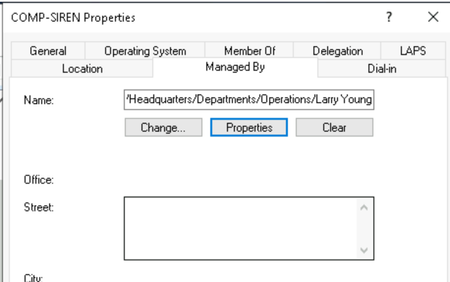
Hey team, i am working on the lab in the title and quite sure there's an issue with the answer for one of the questions. 12. What is the full name of the user on COMP-SIREN that begins with L? I am pretty sure it is Larry Young as you can see from the screenshot. Could i check whether there is an error with the question? Or am i missing somethingSolved400Views1like2Comments
PowerShell Deobfuscation: Ep.8 - Stuck Halfway
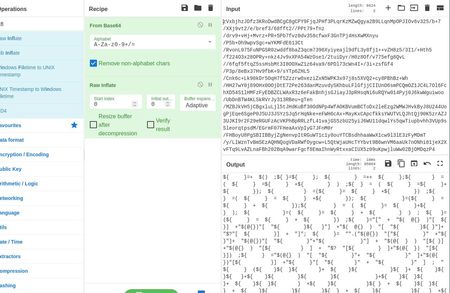
I was working on Ep.8 of PowerShell Deob. Got stuck in second step. Step 1: Base64 & RAW Inflate (Twice) Step 2: Stuck with this weird looking code. Tried to run with PowerShell and received error. Anyone able to help with this?Solved400Views0likes5CommentsFIN7 Threat Hunting with Splunk: Ep.3 – Execution Logs
I am pulling my hair with this last question Rebuild the PowerShell script from the previous question using the three parts found in the PowerShell operational logs. What is the MD5 hash of this file? (The file should not contain any trailing white space or return characters) I ran index=* (EventCode=4104) | search "stager.ps1" AND "scriptblock" | table _raw and added the script content of files (1 of 3) (2 of 3) (3 of 3) to a new file. I removed the spaces and made sure they are glued together. I pasted the file in cyber chef with md5 selected and I keep getting the wrong hash. See a sample of the beginning and end of the 3 files This is just a sample below. I really don't know what else to do with this. $EncodedCompressedFile = @' 7b1pk+LKcjD83RH3P5y4cT/Y0ddusfXAfcMRT5U2JJCgBBJIDn8AAQIklmmgBfz6N7O00sCcnuuxH9vPUcRMo1qycqvMrFItfxmsgu3keHqf//avv/2fP//pH/5NiiJts9+9H//xz+H8fTuPatV/mUXRn//p u3rgE9+I/KPY62u+qTQuvp0Xqu3KPkEovj/867/++Z/+9A9/+oe/jFZbY7757V9/w1+96fpvf3NW78fTJCJRtPP/UfjrvxmT4/Lf//Y3Y3L+x79ML8f54V+6821wXP5VOFcEQfgn+FuDv/CnLnCY/za4HI7zzb9Yp+1xtZn/i7Y9zt93+8H8/WPlQ3Vj8n5YTiKAKe72lxToX4W/prj89aaVHEuOm/g+nxznwyX8mQFuRR38ja3//w== '@ $Decoded = [System.Convert]::FromBase64String($EncodedCompressedFile) $MemStream = New-Object System.IO.MemoryStream $MemStream.Write($Decoded, 0, $Decoded.Length) $MemStream.Seek(0,0) | Out-Null $CompressedStream = New-Object System.IO.Compression.DeflateStream($MemStream, [System.IO.Compression.CompressionMode]::Decompress) $StreamReader = New-Object System.IO.StreamReader($CompressedStream) $Output = $StreamReader.readtoend() $Output | IEXSolved392Views0likes1Comment