feedback
25 Topics
Struggling to find the IT email on Simulations: BarterTown Delivery
During the last few days, I’ve been stuck on this lab, and I’m not sure what I’m missing. The lab asks us to use OSINT tools and techniques to gather intelligence about individuals to target within the organization, with the goal of testing the awareness of BarterTown’s IT staff and eventually gaining a foothold in the internal network. I’ve been using the information provided by the lab as a starting point for my reconnaissance. The website gives us several employees and their email addresses, but none of them are identified as IT staff. I also found the DNS SOA contact (hostmaster.bartertown.bitnet), but that appears to be a standard administrative DNS alias rather than an actual employee. The mail server does not seem to allow useful anonymous user enumeration, and the other reconnaissance results have not revealed the missing user. Has anyone completed this lab and can give me a hint about where/how the missing target information is supposed to be discovered?58Views0likes1Comment 154Views0likes3Comments
Git Security: Git History
Hi all, I’ve been struggling for a while with the last question on this lab, question 7. Where you need to purge access_keys.json from the commit history and force push changes at the end. I’ve tried so many combinations that I’ve lost count. The most recent, which I don’t understand why it’s not working is: git log --diff-filter=A -- *.json To find the commits. git rebase -i <commit_hash> Then changing to edit in the text editor. git push origin --force To force push my changes. This is just one of many ways I’ve tried. Any help would be appreciated, it’s driving me a little mad haha. Thanks, JP132Views0likes1CommentImmersive GUI
Previously, I was able to view multiple questions at once within a lab, which allowed me to plan my approach and see how the questions interlinked. Now i can only see one question at a time and this has made it harder to manage my time and workflow effienciently and sometimes creativity. Is there a way or feature to return to the previous format?501Views1like8CommentsTake part in Immersive research: AI Chatbot in labs
📢 We would love to hear your opinions on a new AI Chatbot concept within our labs. Can you spare an hour to come along to a research call? During the call, you will be asked to undertake a lab on our test environment, using the AI chatbot to assist. We will then ask for feedback on your experience. You will need to attend the call on a laptop or desktop (no tablets or phones) and be able to share your screen throughout. The session will be recorded and will take place using Google Meet. Upon completion of the session, you will receive a £50 eGift card (or local currency equivalent). Sessions are taking place August 12-14th. 🗓️ Sign up at a time that is convenient for you, using this booking form..202Views3likes4Comments
Immersive Labs Advocacy Program
Hey Immersive Labs Team, i am not too sure how do i reach out regarding the program hence is posting here. I previously received an email asking me if i wish to join the IL Advocacy program of which I have filled in the form indicating my interest. However one of your staff Anonymous contacted me to remind me to indicate my interest if I haven't already. Quite sure I did, but nonetheless I filled in the form again. But since then, I have not received any follow up emails regarding it. Was wondering whether there's a bug with the form and whether my submission did went through? :) Thank you and please let me know!143Views1like1Comment
Snort Rules: Ep.7 – Lokibot Infection Traffic
I need help with the last question please. I tried so many rules and I am still getting it wrong 13-Create a Snort rule to detect this User-Agent string in the HTTP header for connections using port 49167, then submit the token. Tried this one which to me it should be able to work. alert tcp any any -> any 49167 (msg:"User-Agent match"; content:"Mozilla/4.08 (Charon; Inferno)"; sid:5000031;) alert tcp any any -> any 49167 (msg:"User-Agent Mozilla/4.08 (Charon; Inferno) detected"; content:"User-Agent: Mozilla/4.08 (Charon; Inferno)"; http_header; sid:5000020;)Solved275Views0likes2Comments
Did anyone actually win anything from the Human Connection Challenge?
It's been quite a while since the challenge ended, and still no official announcement about the winners. There was no live prize draw, and it feels like the whole thing just silently wrapped up. Don’t get me wrong, I’m not mad about not winning a major prize or anything. But it seems like nobody won anything ? I haven’t seen a single post from anyone saying “thank you” or mentioning they received something. That’s... odd, right? If you won a PS5, headphones, or any of the big prizes, please let us know. I’ll honestly be happy if I’m wrong and people did get rewarded. 😊 Just curious if there were actual winners142Views0likes1CommentFIN7 Threat Hunting with Splunk: Ep.3 – Execution Logs
I am pulling my hair with this last question Rebuild the PowerShell script from the previous question using the three parts found in the PowerShell operational logs. What is the MD5 hash of this file? (The file should not contain any trailing white space or return characters) I ran index=* (EventCode=4104) | search "stager.ps1" AND "scriptblock" | table _raw and added the script content of files (1 of 3) (2 of 3) (3 of 3) to a new file. I removed the spaces and made sure they are glued together. I pasted the file in cyber chef with md5 selected and I keep getting the wrong hash. See a sample of the beginning and end of the 3 files This is just a sample below. I really don't know what else to do with this. $EncodedCompressedFile = @' 7b1pk+LKcjD83RH3P5y4cT/Y0ddusfXAfcMRT5U2JJCgBBJIDn8AAQIklmmgBfz6N7O00sCcnuuxH9vPUcRMo1qycqvMrFItfxmsgu3keHqf//avv/2fP//pH/5NiiJts9+9H//xz+H8fTuPatV/mUXRn//p u3rgE9+I/KPY62u+qTQuvp0Xqu3KPkEovj/867/++Z/+9A9/+oe/jFZbY7757V9/w1+96fpvf3NW78fTJCJRtPP/UfjrvxmT4/Lf//Y3Y3L+x79ML8f54V+6821wXP5VOFcEQfgn+FuDv/CnLnCY/za4HI7zzb9Yp+1xtZn/i7Y9zt93+8H8/WPlQ3Vj8n5YTiKAKe72lxToX4W/prj89aaVHEuOm/g+nxznwyX8mQFuRR38ja3//w== '@ $Decoded = [System.Convert]::FromBase64String($EncodedCompressedFile) $MemStream = New-Object System.IO.MemoryStream $MemStream.Write($Decoded, 0, $Decoded.Length) $MemStream.Seek(0,0) | Out-Null $CompressedStream = New-Object System.IO.Compression.DeflateStream($MemStream, [System.IO.Compression.CompressionMode]::Decompress) $StreamReader = New-Object System.IO.StreamReader($CompressedStream) $Output = $StreamReader.readtoend() $Output | IEXSolved536Views0likes1CommentActive Directory Basics: Demonstrate Your Skills
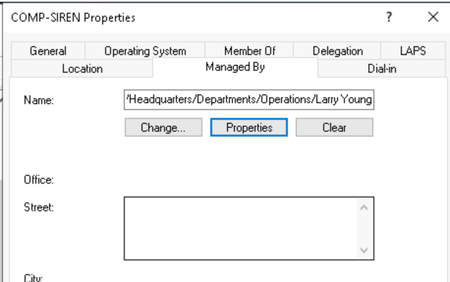
Hey team, i am working on the lab in the title and quite sure there's an issue with the answer for one of the questions. 12. What is the full name of the user on COMP-SIREN that begins with L? I am pretty sure it is Larry Young as you can see from the screenshot. Could i check whether there is an error with the question? Or am i missing somethingSolved301Views0likes3Comments