content assignment
3 TopicsGrow Your Career Leaning Into a New Tool Your Manager Will Rely On
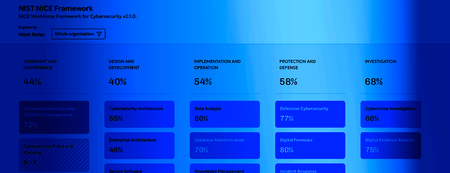
Welcome back to our series, “Behind the Scenes of Immersive One”! The following is a conversation with AmyMillard, Product Manager for Immersive One, and RebeccaSchimmoeller, Lead Product Marketing Manager. Today, we’re talking about how you can grow your professional cache with help from Immersive One’s new NIST NICE Heat Map. “POV: Being told to sit through training knowing what’s been assigned won’t take you where YOU want to go. ” Rebecca: You’re not kidding, Amy! That’s pure pain, no matter what your role is. Finding time to exercise amidst the fray is hard enough, perhaps especially for those of us in cyber security. Amy: Exactly. If you’re an analyst and you hear your boss talking about the NIST NICE Framework, you may default to thinking you’re in for a lot of busy work to meet compliance audits. For me, building out the NIST NICE Heat Map for Immersive One has been a labor of love. Because the way we’ve approached it connects the dots for everyone in the organization, from analysts all the way up to the C-suite. Rebecca: I got that about you, Amy. You seemed as dialed in to the value for practitioners as to what the Heat Map would show execs. Amy: Truly. Frameworks have a reputation for being “manager-ware,” but they’re also a powerful tool for career growth. If you’re an analyst, your value is often trapped in a black box. You know you’re a pro at Vulnerability Analysis, but how do you prove that in a way that’s objective and recognized globally? The NIST NICE Heat Map aligns every lab you complete to the 41 official NIST NICE Work Roles. That means your activity becomes a high-fidelity "resume" that updates in real-time. It’s not just a dashboard for your boss; it can support individuals’ career growth. Rebecca: I love that. It’s completely transforming perspective from "I did X hours of training" to "I show 71% alignment with a Tier 2 Incident Responder role." When your manager can see your progress and how it supports team-wide readiness, that’s powerful. But there’s another side of this—the spots on the map that aren’t showing full readiness. What does that mean to practitioners? Amy: Think of it from a manager’s perspective: the fastest way to lose a high-performer is to mandate training they don't need. The Heat Map helps managers be more deliberate in who exercises on what capability. If your map shows you're missing a specific piece of the puzzle—like Knowledge statement K0716—you get assigned that piece. No more sitting through a whole 4-hour "Cyber 101" course. Assignments become much more intentional, so you know that when you’re assigned an exercise, you’re being asked to focus on what matters most to your role and the organization’s need areas. Rebecca: I love that. You’re swapping busy work for actual professional development. It’s a lot easier to feel motivated when you know every lab is making you more indispensable—and that your boss is seeing those wins update every single morning. Amy: Every morning at 0300 GMT, in fact! If you’ve been grinding, your readiness profile reflects that the very next day. It makes your commitment visible to the people who matter most to your career, without you having to manually report what you’ve been tackling. Rebecca: It’s the "show, don't tell" of career progression. Final question, Amy: If I’m an analyst and my Manager recognizes the platform content only covers 70% of a very niche role I want to master, what’s my next move? Amy: Well, if your manager sees you’ve maxed out the available "Heat" for a role, it sets up a conversation about what’s next for you. They may see an opportunity to use AI Lab Builder to develop custom content for your role. But remember, the map also helps your manager identify where there are capability gaps across the team. You may be positioned to help your Manager close one of those. Rebecca: Wow, turning what you thought was a compliance tool into a career ladder? Amy: Exactly. The data can work for you as much as it can for your organization. Final Thought Your work in Immersive One is already feeding your professional profile. Log in today to keep sharpening your craft.97Views2likes0CommentsNo More Busy Work: How Programs Automate Personalized Cyber Readiness
Welcome back to our series, “Behind the Scenes of Immersive One”! The following is a conversation with MartinHewitt, Principal Product Manager for Immersive One, and RebeccaSchimmoeller, Lead Product Marketing Manager. “We’ve all seen the spreadsheet of doom. You assign a list of training labs to fifty people, and then you spend the next month chasing them down, manually checking completion statuses, and hoping the content you’ve assigned them is actually relevant—because if it’s not, your learners are just tuning out. It’s an operational nightmare, plain and simple.” Rebecca: Wow, yeah, we hear this constantly from the market, Martin. Leaders are drowning in admin work while trying to build resilience. It feels like we’ve been handing learners a stack of maps and hoping they figure out the route. Meanwhile, busy learners assume the content isn’t worth their time, so disengage. How does the new Programs capability change that dynamic? Martin: That map analogy is actually spot on. Until now, we’ve had Assignments and Collections—which are great, but they are static. Like you said, it’s handing someone a map. Programs is a fundamental shift … a GPS navigation system for learning. Instead of just handing a learner a stack of content and hoping for the best, a Program plots the optimal route based on their initial skill level. It re-routes them if necessary using logic, and it shows the manager if they fall behind schedule. We aren’t just looking at completion anymore; we are looking at flow. Rebecca: I love the "GPS" concept. But let’s make this real for our customers. What does one of these "routes" actually look like? Can you give us a concrete example of a path a team might take? Martin: Absolutely. Let’s look at the SOC Analyst Program. It doesn’t just start with a generic to-do list. It starts with an Adaptive Assessment. Based on those results, if the system sees a user is proficient and capable, it will route them into content that speaks to their level of knowledge and experience, rather than a one-size-fits-all (or, more often none) route. We see this for Cloud Security too. Engineers who know AWS inside-out don't need to waste time on S3 Buckets 101. The Program fast-tracks them to the advanced Cloud Defense scenarios. It’s about respecting their time Rebecca: That’s a perfect segue to the learner’s experience. We talk a lot about the manager’s benefit, but honestly, if I’m an analyst, why should I care? How does this make my day or professional life better? Martin: If you’re a learner, the biggest benefit is that you stop doing "busy work." Nothing kills morale faster than being a senior engineer forced to click through beginner labs just to get a completion checkmark. With Programs, the system recognizes your skill level immediately. You get to skip the stuff you already know and focus on the challenges that actually help you grow. Plus, because it’s a cohesive journey, you always know why you are doing a task. You aren’t just completing a random lab; you are moving through a cyber-narrative—from detection to analysis to remediation. It feels less like homework and more like a mission. Rebecca: So, we’re moving from "did you do it?" to "are you ready?" That sounds like it aligns perfectly with the CISO’s need to prove outcomes. But Martin, what about the manager’s visibility? You mentioned "flow" earlier—how is that different from just tracking who finished a lab? Martin: Right now, if you want to know who is struggling, you usually have to wait until the deadline passes and see who didn't finish. By then, it’s too late. With Programs, we focus on Pace. We capture a time commitment expectation—say, two hours a week—and the system calculates a "Burndown Rate." We can tell you in real-time if a user is Ahead, On Track, or Behind. It’s about finding what I call the "Bread and Valley Joes"—the people who are struggling silently. We want to surface those users to the manager before they fail, as well as highlighting the super-keen folk who really love stretching and testing their skills, we’re showing them as Ahead, making sure they’re spotted and give them the opportunity for recognition. Rebecca: That’s huge for "Management by Exception." You don't need to micromanage the high-performers, but you can quickly help those who are stuck. Martin: Exactly. And we’ve built the intervention right into the platform. You can filter for everyone who is "Behind" or stuck on a specific step—like Cloud Fundamentals—and bulk-message them right there. No more downloading CSVs and running mail merges just to nudge your team. Rebecca: Martin, this is a massive step forward. But knowing you and the engineering team, you’re already looking at what’s next. Can you give us a sneak peek at what’s coming for Programs? Martin: Don’t mind if I do! Right now, we have these amazing "Stock Programs" ready to go. In the New Year, we’re also handing the keys to customers … we’re going to introduce a custom builder. Managers will be able to build a completely bespoke journey tailored to their specific organization, drawing from right across our whole catalog. Things like being able to create your own "onboarding flow" to mirror your exact tech stack and security policies…. That’s when things will get even more exciting. Rebecca: I can't wait to see what customers build when that’s available, Martin. Thanks for walking us through the logic behind this milestone launch. This is major for customer outcomes. Martin: It is. We’re finally moving learners from just "completing tasks" to building real muscle memory. That’s the stuff that benefits their org now, and that they can carry it with them to their next professional opportunity. Final Thought Programs represent a shift that benefits the entire security function. For the organization, it replaces static assignments with an operational engine that measures true readiness against critical threats. For the learner, it transforms training from a checklist into a career-building journey, ensuring they develop skills that last far beyond their current role. Want to see how it works? Don’t miss this demo.81Views0likes0CommentsRecommendations for Writing a Program Welcome Email
Key Objectives of the Email Generate Excitement: Make employees want to participate. Clearly State Benefits: What's in it for them? Provide Clear Next Steps: How do they get started? Assure Support: Who to ask for help? Reinforce Company Vision: Link individual growth to organizational success. Recommended Email Structure & Content 1. Compelling Subject Line Purpose: Grab attention, convey value immediately. Examples: "Unlock Your Potential: Introducing [Program Name]!" "Elevate Your Skills: Your Gateway to Growth is Here!" "Future-Proof Your Career: Announcing Our New Upskilling Initiative!" "Exciting News: Your Path to [Skill Area] Mastery Starts Now!" "Invest in Yourself: [Company Name]'s New Upskilling Program" 2. Warm & Enthusiastic Opening Purpose: Welcome, set a positive tone. Content: "Dear [Employee Name]," or "Hello Team," "We're thrilled to announce..." or "Get ready to elevate your career..." "At [Company Name], we believe in fostering continuous growth and development for every member of our team." 3. Program Overview (The "What") Purpose: Briefly explain what the program is. Content: Introduce the program name (e.g., "The [Program Name] Upskilling Initiative"). Briefly describe its scope (e.g., "a comprehensive program designed to enhance critical skills," "a tailored learning experience focusing on [key skill areas]"). Mention the format (e.g., "via interactive online modules," "expert-led workshops," "hands-on labs"). 4. Benefits to the Employee (The "Why Them") Purpose: This is the most crucial section – articulate the direct value to the individual. Content: "Why should you participate? This program is designed to help you:" Advance your career: "Unlock new opportunities for career growth within [Company Name]." Stay competitive: "Master the latest industry skills and technologies." Boost your confidence: "Deepen your expertise and take on new challenges." Enhance your impact: "Contribute even more effectively to your team's and [Company Name]'s success." Personal Growth: "Invest in your personal and professional development." (Optional but impactful): "Aligned with our commitment to [Company Value, e.g., Innovation, Excellence]." 5. How to Get Started (Clear Call to Action - CTA) Purpose: Make enrollment easy and intuitive. Content: "Getting started is simple! Here's how to begin your learning journey:" Provide a clear, clickable link: "Click here to explore the [Program Name] Hub." Brief instructions: "Log in with your [Company Credentials]," "Browse the course catalog," "Enroll in your first module." Mention any deadlines or enrollment periods if applicable. 6. Support & Resources: Purpose: Assure employees they won't be alone. Content: "We're committed to supporting you every step of the way." "For any questions, technical support, or guidance on choosing your learning path, please contact [L&D Team Email/Name, or specific Slack channel]." “Speak with your manager and map this to your own Professional Development Plan (PDP) for regular support and feedback” “We're so excited to celebrate your successes with you, and we're here to offer a helping hand as you grow!” Mention FAQs or a dedicated resource page if available. 7. Closing Purpose: Reinforce enthusiasm and look forward to their participation. Content: "We are incredibly excited about the potential this program holds for your individual growth and our collective success." Reinforce / remind positive impact to organisation “This program will make [Company Name] continue to be class leading / stay ahead of the competition / be the best place to work” "We look forward to seeing you thrive!" "Sincerely," / "Best regards," / "Warmly," [Your Name/Learning & Development Team/Leadership Team] General Recommendations for Effectiveness Personalization: Always use the recipient's name. Conciseness: Get to the point. Employees are busy. Visuals (Optional but Recommended): Consider including a compelling image or a short introductory video if available. Follow-Up Strategy: Plan reminder emails for those who haven't enrolled, and share success stories later. Manager Communication: Ensure managers are informed before the general team, so they can support and encourage participation. By following these recommendations, your upskilling program launch email can effectively motivate employees and kickstart a successful learning initiative.86Views1like0Comments